
Tracking time for a single project is straightforward. Tracking time across 5 clients, 12 projects, and 3 developers simultaneously is where most time tracking systems fall apart. Context switching between clients, overlapping deadlines, and mixed billable/non-billable work create a complex attribution challenge that manual tracking simply cannot handle reliably.
For freelance developers and small agencies, this complexity is the norm rather than the exception. A typical day might include morning work on Client A's frontend, a midday bug fix for Client B, an afternoon feature build for Client C, and internal work on your own product. Without a system that automatically attributes time to the correct client and project, revenue leaks, billing inaccuracies, and administrative chaos are inevitable.
This guide provides a complete framework for managing time tracking across multiple clients and projects, from organizational structure to automated attribution to professional billing workflows. For teams already handling international clients, our guide on multi-currency time tracking covers the additional billing complexity.
The Multi-Client Time Tracking Challenge
Why It's Harder Than It Sounds
Attribution Accuracy When you switch between Client A and Client B four times in a day, manual time tracking produces rough estimates at best. Studies show that professionals lose 10-20% of billable time to inaccurate attribution across multiple projects.
Context Switching Costs The average developer switches between projects 3-5 times per day. Each switch requires not just mental context change, but also time tracking context change—stopping one timer, starting another, remembering to log the gap time.
Rate Complexity Different clients often have different billing rates, currencies, and billing cycles. Managing this manually across 5+ clients introduces significant error potential.
Reporting Demands Each client expects professional timesheets formatted to their specifications, delivered on their preferred schedule, in their preferred currency. Generating these manually for multiple clients is a weekly time sink.
Common Problems
- Forgotten Time Entries: Switching between clients makes it easy to lose track of smaller tasks
- Double Attribution: Accidentally logging the same time to two clients
- Rate Errors: Applying the wrong billing rate to the wrong client
- Delayed Billing: Taking too long to compile timesheets for multiple clients
- Scope Bleed: Client work bleeding into internal time without clear boundaries
Setting Up Your Multi-Client Structure
Step 1: Organize Your Project Hierarchy
Create a clear hierarchy that maps your business structure to your time tracking system:
Your Company
├── Client: Acme Corp ($150/hr, USD, Monthly billing)
│   ├── Project: E-Commerce Platform
│   │   ├── Repo: acme-ecommerce-frontend
│   │   └── Repo: acme-ecommerce-backend
│   └── Project: Mobile App
│       └── Repo: acme-mobile
│
├── Client: TechStart Inc ($175/hr, USD, Bi-weekly billing)
│   └── Project: SaaS Platform
│       ├── Repo: techstart-api
│       └── Repo: techstart-dashboard
│
├── Client: GlobalCo ($130/hr, EUR, Weekly billing)
│   └── Project: Data Pipeline
│       └── Repo: globalco-pipeline
│
└── Internal
    ├── Project: Company Website
    │   └── Repo: company-site
    └── Project: Internal Tools
        └── Repo: internal-tools
Step 2: Establish Repository-Based Attribution
The most reliable multi-client tracking uses repository ownership as the attribution mechanism. When each client's work lives in dedicated repositories, every commit is automatically attributed to the correct client.
Setting Up in LogTime.ai:
- Create each client with their billing rate and currency
- Create projects under each client
- Connect GitHub repositories to the corresponding projects
- Configure webhook for all tracked repositories
Once configured, the attribution is automatic:
Commit to acme-ecommerce-frontend → Acme Corp, E-Commerce Platform
Commit to techstart-api → TechStart Inc, SaaS Platform
Commit to globalco-pipeline → GlobalCo, Data Pipeline
Commit to company-site → Internal, Company Website
Step 3: Handle Shared Repository Scenarios
Some teams use monorepos or shared codebases across clients. Handle this with branch-based attribution:
Branch Naming Convention:
  client/acme/feature-name → Routes to Acme Corp
  client/techstart/feature-name → Routes to TechStart Inc
  internal/feature-name → Routes to Internal projects
For monorepos, directory-based attribution provides another layer:
/clients/acme/* → Acme Corp
/clients/techstart/* → TechStart Inc
/shared/* → Split proportionally or categorize as internal
Daily Workflow for Multi-Client Teams
Morning Planning
Start each day with a clear plan of which clients you'll work on:
Monday Schedule:
  9:00-11:30  → Acme Corp (E-Commerce frontend features)
  11:30-12:00 → TechStart (Code review)
  12:00-1:00  → Lunch (non-billable)
  1:00-3:30   → GlobalCo (Data pipeline migration)
  3:30-4:30   → Acme Corp (Bug fixes)
  4:30-5:00   → Internal (Admin, email, planning)
With automated tracking, you don't need to actively manage timers during these transitions. Work on the appropriate repository, and time is attributed correctly.
Handling Quick Interruptions
Client B sends an urgent bug report while you're working on Client A. With manual tracking, you'd need to:
- Stop Client A timer
- Start Client B timer
- Fix the bug
- Stop Client B timer
- Restart Client A timer
With automated GitHub-based tracking, you simply:
- Switch to Client B's repository
- Fix the bug and commit
- Switch back to Client A's repository
The commit-based tracking handles attribution automatically, even for 10-minute interruptions.
End-of-Day Review
Spend 5 minutes reviewing the day's automatically captured time:
- Verify all commits were captured correctly
- Add non-code activities if needed (meetings, calls, planning)
- Flag any entries that need adjustment
Professional Billing Across Multiple Clients
Timesheet Generation Per Client
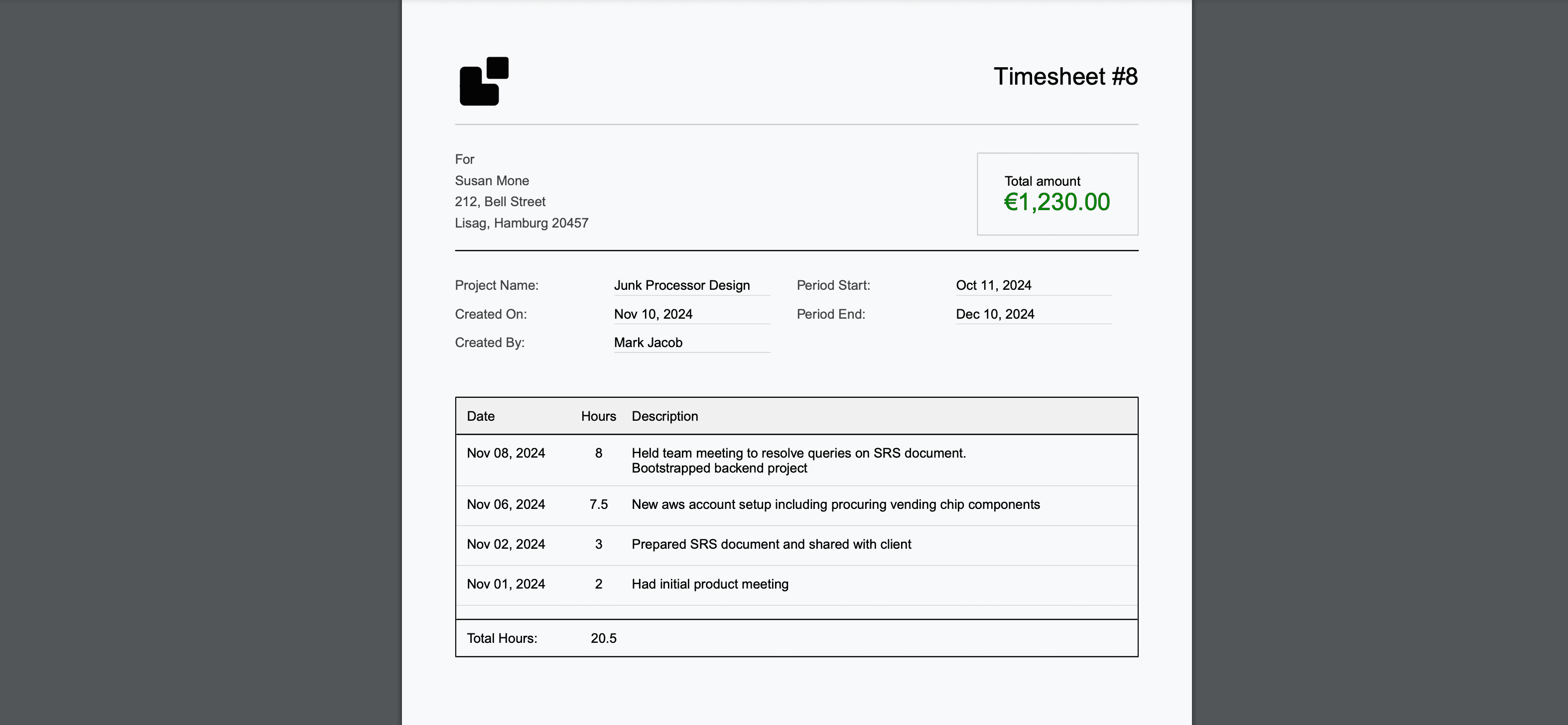
Each client should receive a dedicated, professional timesheet. With LogTime.ai, this is automated:
Client A Timesheet (Monthly):
- Company branding with your logo
- All work entries with professional descriptions
- Hourly breakdown by project and developer
- Total hours and amount in client's currency
- Period summary and running totals
Client B Timesheet (Bi-weekly):
- Same professional format, different schedule
- Different billing rate applied automatically
- Different currency if applicable
Rate Management
Track rates per client with automatic application:
Rate Configuration:
  Acme Corp: $150/hr USD
  TechStart Inc: $175/hr USD
  GlobalCo: €130/hr EUR (auto-converted for your reporting)
  Internal: $0/hr (non-billable)
Advanced rate scenarios:
Acme Corp Rates:
  Standard Development: $150/hr
  Rush/Weekend Work: $225/hr (1.5x)
  Support/Maintenance: $125/hr
  Consulting/Planning: $175/hr
Billing Cycle Management
Different clients, different billing cycles:
Billing Calendar:
  Week 1, Monday: Generate GlobalCo weekly timesheet
  Week 2, Friday: Generate TechStart bi-weekly timesheet
  Month End: Generate Acme Corp monthly timesheet
  Month End: Generate internal time report for management
LogTime.ai can automate this delivery schedule, so timesheets go out consistently without manual effort.
Common Scenarios and Solutions
Scenario 1: Context-Heavy Client Switching
Problem: Developer works on 4 different client projects in one day, making manual tracking unreliable.
Solution: Repository-based automatic tracking ensures every commit goes to the right client, regardless of how often the developer switches contexts. The key is maintaining separate repositories per client.
Scenario 2: Shared Meeting Time
Problem: A meeting involves discussion of multiple client projects. How do you attribute the time?
Solution: Options include:
- Attribute to the primary client discussed
- Split proportionally based on topics covered
- Categorize as internal/overhead and distribute across clients in reporting
Scenario 3: Scope Creep Detection
Problem: Client asks for "quick changes" that accumulate into significant untracked work.
Solution: With automated tracking, every commit is logged regardless of how "small" the change seems. This creates an automatic record that reveals scope creep:
Acme Corp - September:
  Planned Sprint Work: 120 hours
  "Quick Fix" Requests: 34 hours (28% overhead!)

  Action: Renegotiate scope or establish change request process
Scenario 4: Internal vs. Billable Time
Problem: Developers spend time on internal improvements (CI/CD, tooling, documentation) that benefits all clients but isn't billable to any specific one.
Solution: Create an explicit "Internal" project and track this time separately. Review monthly to ensure internal time stays within acceptable bounds:
Monthly Time Distribution:
  Billable Client Work: 85% (target: >80%)
  Internal/Tooling: 10% (target: <15%)
  Admin/Overhead: 5% (target: <10%)
Scenario 5: Contractor or Subcontractor Time
Problem: You hire subcontractors for specific client projects and need to track their time for billing and margin analysis.
Solution: Add contractors to the relevant project in your tracking tool with their cost rate. This enables margin analysis:
Acme Corp - Developer A:
  Client Rate: $150/hr
  Internal Cost: $100/hr (salary equivalent)
  Margin: $50/hr (33%)

Acme Corp - Contractor B:
  Client Rate: $150/hr
  Contractor Cost: $85/hr
  Margin: $65/hr (43%)
Scaling Multi-Client Tracking
From Solo to Team
As you grow from solo freelancer to a team, multi-client tracking requires additional structure:
Solo (1 person, 2-4 clients):
- Simple repository-based attribution
- Direct client billing
- Personal review of all time entries
Small Team (2-5 people, 5-10 clients):
- Project lead reviews time entries before billing
- Weekly team sync on client allocation
- Automated timesheet generation per client
Agency (10+ people, 10+ clients):
- Dedicated project managers per major client
- Automated reporting dashboards
- Client-specific billing workflows
- Resource allocation planning based on tracked capacity
Maintaining Quality at Scale
As client count grows, maintain tracking quality with:
- Automated attribution: Never rely on manual client selection
- Weekly reviews: Catch attribution errors before billing
- Client feedback: Ask clients if timesheets accurately reflect work they received
- Regular audits: Quarterly comparison of tracked time vs. project estimates
Tools and Techniques
Recommended Stack for Multi-Client Teams
Time Tracking: LogTime.ai for automated GitHub-based tracking with per-client organization and multi-currency billing.
Project Management: Linear or GitHub Projects for per-client issue tracking and sprint management.
Communication: Dedicated Slack channels per client to maintain clear boundaries.
File Organization: Separate repositories per client, consistent naming conventions.
Automation Opportunities
- Timesheet delivery: Automated email delivery on client-specific schedules
- Budget alerts: Automatic notifications when client hours approach budget limits
- Utilization reports: Weekly team utilization summaries for resource planning
- Invoice generation: Convert approved timesheets to invoices automatically
Measuring Success
Key Metrics
- Attribution Accuracy: >95% of time entries correctly attributed to clients
- Billing Completeness: <5% of billable time goes unbilled
- Timesheet Delivery: 100% of client timesheets delivered on schedule
- Client Disputes: <2% of timesheets generate billing questions
- Administrative Overhead: <30 minutes/week per client for time management
Continuous Improvement
Monthly review checklist:
- Are all client repositories connected and tracking?
- Are billing rates current for all clients?
- Have any clients requested timesheet format changes?
- Is non-billable time within target percentages?
- Are there new clients that need onboarding?
Conclusion
Managing time tracking across multiple clients and projects doesn't have to be chaotic. The key is automated attribution through repository-based tracking, clear organizational structure, and professional per-client billing workflows.
With the right tooling, the complexity of multi-client tracking becomes invisible. Developers focus on building great software across all their projects, while the time tracking system quietly captures every hour and routes it to the correct client for professional billing.
Ready to simplify multi-client time tracking? Start your free LogTime.ai trial and experience how automated attribution eliminates the chaos of tracking time across multiple clients and projects.
Managing time for multiple clients and need setup guidance? Contact support@logtime.ai for help organizing your multi-client tracking structure.