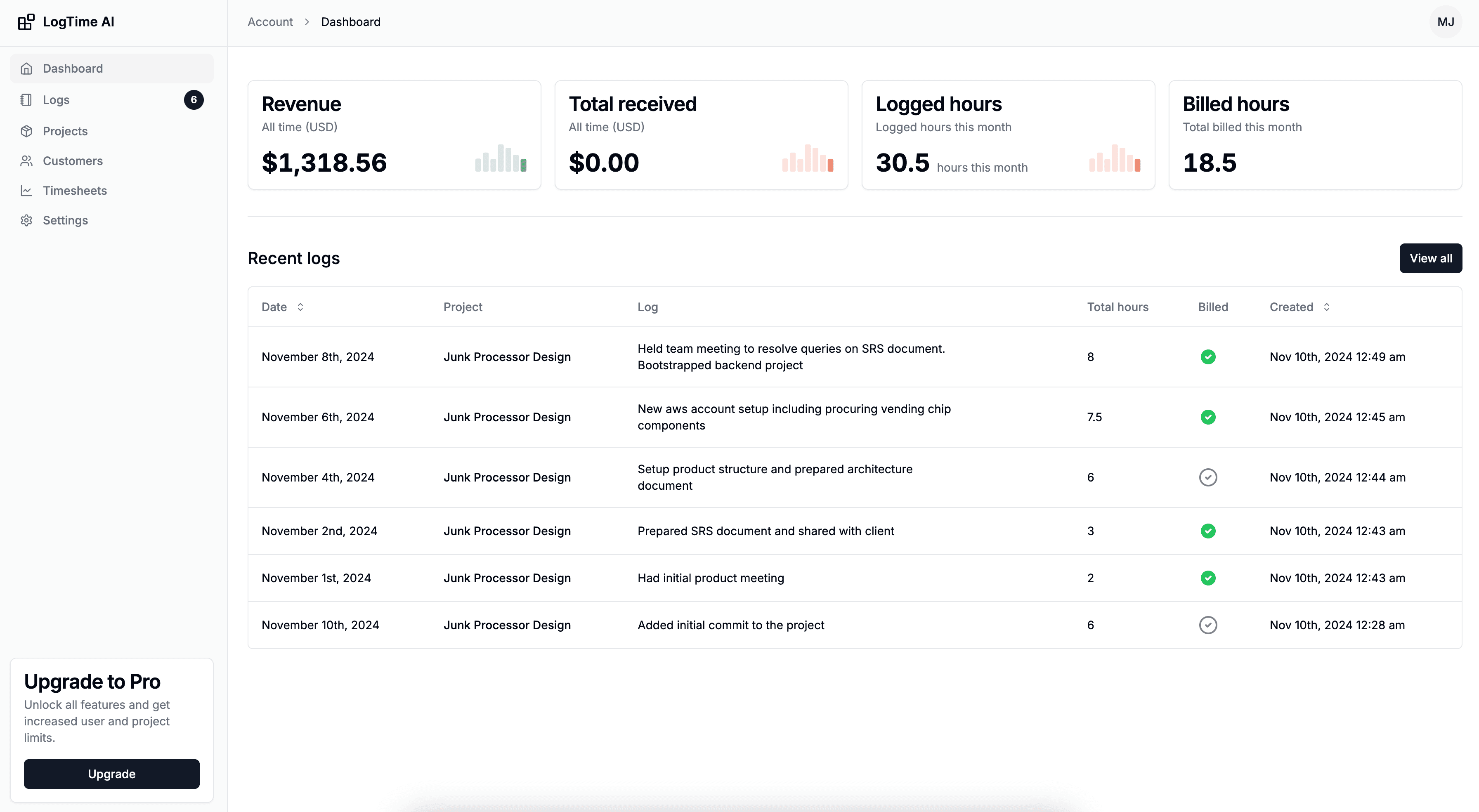

Developer time tracking tools fall into two fundamentally different categories: those that measure coding activity and those that manage billable time. Wakatime and Code Time represent the first category—IDE plugins that track coding metrics. LogTime.ai represents the second—a platform that converts development activity into professional time entries and client-ready timesheets.
Understanding this distinction is crucial for choosing the right tool. If you need coding productivity insights, you're making a different decision than if you need accurate client billing. And if you need both, you'll want to understand where each tool excels and where it falls short.
This comparison provides an honest, detailed analysis of all three tools to help you make the right choice for your specific needs. For broader context on developer-focused time tracking options, our top 10 time tracking tools for freelance developers covers additional alternatives.
Quick Comparison Overview
| Feature | Wakatime | Code Time | LogTime.ai |
|---|---|---|---|
| Primary Purpose | Coding metrics | Coding metrics + flow | Billable time management |
| Tracking Method | IDE plugin | IDE plugin | GitHub integration |
| Manual Input | None | None | None |
| Client Billing | No | No | Yes |
| Timesheet Generation | No | No | Yes (AI-powered) |
| AI Descriptions | No | No | Yes |
| Multi-Currency | No | No | Yes |
| GitHub Integration | Display only | Display only | Full (commits → time logs) |
| Team Management | Limited | Limited | Full |
| Free Tier | Yes (limited) | Yes | 30-day trial |
| Pricing | $9/mo premium | Free / $6.99/mo | From $9/mo |
Wakatime: Deep Dive
What It Does
Wakatime is an IDE plugin that automatically tracks time spent coding. It captures which languages, projects, files, and editors you use, presenting this data through dashboards and leaderboards.
How It Works
- Install the Wakatime plugin in your IDE (VS Code, IntelliJ, Vim, etc.)
- The plugin detects when you're actively typing or navigating code
- Activity is logged automatically with language, project, and file metadata
- Data appears on your Wakatime dashboard within minutes
Strengths
Effortless Coding Metrics Wakatime requires zero interaction after installation. It silently tracks coding activity and provides detailed breakdowns of time spent per language, project, and file.
Broad IDE Support With plugins for 60+ editors and IDEs, Wakatime works regardless of your preferred development environment.
Community and Leaderboards Public profiles and leaderboards create motivation through social accountability. Developers can showcase their coding activity.
Embeddable Stats GitHub profile badges and embeddable widgets display coding stats on personal websites and READMEs.
Limitations
Only Tracks Active Coding Wakatime measures time in the IDE only. It doesn't capture:
- Code reviews in GitHub
- Design and architecture discussions
- Client meetings and planning
- DevOps and deployment work
- Documentation writing outside the IDE
- Debugging in browser developer tools
For most developers, active coding represents only 40-60% of total work time. The rest is invisible to Wakatime.
No Billing Capabilities Wakatime provides no way to:
- Generate timesheets for clients
- Set billing rates per project
- Create professional invoices
- Handle multi-currency billing
- Track billable vs. non-billable time
Limited Team Features While Wakatime offers team dashboards, they're focused on coding metrics rather than project management, resource allocation, or capacity planning.
Privacy Concerns Some developers are uncomfortable with file-level tracking that reveals exactly what code they're working on at any given time.
Pricing
- Free: 2 weeks of history, limited dashboards
- Premium: $9/month for full history, advanced features, and team access
Best For
Individual developers who want automated coding metrics and productivity insights without any billing or client management needs.
Code Time: Deep Dive
What It Does
Code Time is a VS Code extension (also available for other IDEs) that tracks coding time and provides flow state detection, helping developers understand their productivity patterns.
How It Works
- Install the Code Time extension in your IDE
- The extension tracks active coding sessions automatically
- Flow state detection identifies your most productive periods
- Data appears in an in-editor dashboard and web portal
Strengths
Flow State Detection Code Time's distinguishing feature is its ability to identify when you're in a flow state—sustained periods of focused coding. This insight helps developers protect and optimize their most productive hours.
Calendar Integration Code Time connects with your calendar to show how meetings impact coding time, providing a complete picture of how your day is divided between coding and meetings.
Work-Life Balance Insights The tool tracks when you code (early morning, late night, weekends) and helps identify overwork patterns.
Free Core Features The free tier includes most tracking and insight features, making it accessible without any commitment.
Limitations
VS Code-Centric While Code Time supports other editors, the best experience is in VS Code. Teams using IntelliJ, Vim, or other editors get a reduced feature set.
No Billing or Client Management Like Wakatime, Code Time is focused on personal productivity metrics. It offers no:
- Client billing features
- Timesheet generation
- Invoice creation
- Multi-currency support
- Team billing workflows
Limited Project Attribution Code Time tracks time by repository and file, but doesn't connect this to business entities like clients, billing rates, or project budgets.
Smaller Ecosystem Code Time has a smaller user community than Wakatime, which means fewer integrations and less community-driven development.
Pricing
- Free: Core tracking, flow state detection, basic insights
- Pro: $6.99/month for advanced analytics, team features, and integrations
Best For
Individual developers using VS Code who want flow state awareness and work-life balance insights alongside basic coding time metrics.
LogTime.ai: Deep Dive
What It Does
LogTime.ai converts GitHub development activity into professional time entries, timesheets, and billing-ready reports. It's designed for the business side of development time management rather than personal coding metrics.
How It Works
- Connect GitHub repositories via webhook integration
- Every commit and pull request triggers automatic time entry creation
- AI analyzes code complexity to estimate time investment
- Technical commit messages are transformed into professional descriptions
- One-click timesheet generation with company branding and multi-currency support
Strengths
End-to-End Billing Automation LogTime.ai covers the entire pipeline from code commit to client-ready timesheet. No other developer-focused tool provides this level of billing automation.
AI-Powered Descriptions
Technical commit messages like fix(auth): resolve JWT token refresh race condition become professional descriptions like "Resolved authentication token management issue to improve session reliability and user experience." This saves significant time in preparing client-facing documents.
Multi-Currency International Billing For developers working with international clients, LogTime.ai handles currency conversion automatically—set the client's preferred currency and timesheets are generated accordingly.
Team and Client Management Full organizational structure with clients, projects, team members, and billing rates provides the business infrastructure that coding metrics tools lack.
GitHub-Native Approach By tracking commits rather than IDE activity, LogTime.ai captures time for all GitHub-connected work—including code reviews, PR discussions, and CI/CD-related changes—not just active coding in an editor.
Limitations
GitHub Dependency LogTime.ai requires GitHub as the development platform. Teams using GitLab, Bitbucket, or other version control systems currently cannot use the full automation pipeline.
No IDE-Level Metrics LogTime.ai doesn't provide language-level breakdowns, flow state detection, or file-level coding analytics. It tracks output (commits) rather than input (keystrokes).
Requires Commit Discipline The tool works best with frequent, well-described commits. Teams with infrequent or poorly messaged commits get less accurate results.
Pricing
- Basic: $9/month (5 users, 10 projects)
- Pro: $49/month (25 users, 50 projects)
- Enterprise: $199/month (unlimited)
- 30-day free trial with no credit card required
Best For
Development teams, freelancers, and agencies that bill clients for development work and need automated timesheet generation from GitHub activity.
Head-to-Head Comparison
For Freelance Developers Billing Clients
Winner: LogTime.ai
Freelancers need two things from time tracking: accurate capture and professional billing. Wakatime and Code Time provide the first but not the second. LogTime.ai provides both through GitHub integration.
Freelancer scenario: 3 clients, 120 billable hours/month

With Wakatime:
  Tracked: ~70 hours of active coding (out of 120 total work hours)
  Billing: Manual timesheet creation needed
  Time spent on admin: 3-4 hours/month
  Billable hours captured: ~85% (manual estimates fill gaps)

With LogTime.ai:
  Tracked: ~114 hours automatically via commits
  Billing: One-click timesheet per client
  Time spent on admin: ~15 minutes/month
  Billable hours captured: ~95%
For Individual Productivity Optimization
Winner: Wakatime or Code Time
If your goal is understanding personal coding patterns—which languages you use most, when you're most productive, how meetings affect your output—IDE-based tools provide richer data.
Code Time edges ahead if flow state detection is important to you. Wakatime wins on breadth of IDE support and community features.
For Agency or Team Billing
Winner: LogTime.ai
Agencies managing multiple clients, developers, and billing rates need business-oriented time management. Neither Wakatime nor Code Time was designed for this use case.
Agency scenario: 10 developers, 8 clients, mixed currencies

With Wakatime:
  Can track: Individual coding metrics per developer
  Cannot do: Generate client timesheets, manage billing rates,
            handle multi-currency, produce professional reports

With LogTime.ai:
  Can track: All development activity per client/project
  Can do: Automated timesheets per client, multi-currency billing,
          team utilization reports, professional branded reports
For Open Source Contributors
Winner: Wakatime
Open source developers who want to showcase their coding activity find Wakatime's public profiles, GitHub badges, and leaderboards most useful. This is a social and personal branding use case where billing is irrelevant.
For Teams Using Non-GitHub Platforms
Winner: Wakatime or Code Time
Since LogTime.ai currently requires GitHub, teams on GitLab, Bitbucket, or other platforms are better served by IDE-based tools that work regardless of the version control platform.
Can You Use Them Together?
Yes—and for some teams, combining tools makes sense:
Wakatime + LogTime.ai: Use Wakatime for personal coding metrics and flow insights. Use LogTime.ai for client billing and timesheet generation. There's no conflict since they track through different mechanisms (IDE vs. GitHub).
Code Time + LogTime.ai: Similar combination—Code Time for productivity patterns and flow state awareness, LogTime.ai for the business side of time management.
The key insight is that these tools serve different purposes and operate through different mechanisms, so running them simultaneously doesn't create conflicts or double-tracking issues.
Making Your Decision
Choose Wakatime if:
- You want personal coding metrics and productivity insights
- You don't need client billing or timesheet generation
- You use multiple IDEs and want broad editor support
- You enjoy community leaderboards and public coding profiles
Choose Code Time if:
- Flow state detection and work-life balance matter most
- You primarily use VS Code
- You want free core features without premium commitment
- Calendar integration for meeting impact analysis is valuable
Choose LogTime.ai if:
- You bill clients for development work and need professional timesheets
- Your team uses GitHub and wants zero-effort time tracking
- Multi-currency international billing is a requirement
- You need team management with client and project organization
- Accurate billable hour capture directly impacts your revenue
Conclusion
The choice between Wakatime, Code Time, and LogTime.ai comes down to what you need from time tracking. For coding insights and personal productivity, Wakatime and Code Time are excellent. For billing, client management, and professional timesheet generation, LogTime.ai is purpose-built.
Many developers find that using an IDE-based metrics tool alongside LogTime.ai gives them the best of both worlds: personal productivity awareness plus automated business billing.
Ready to automate your client billing workflow? Start your free LogTime.ai trial and experience how GitHub-native time tracking transforms the business side of development.
Deciding between developer time tracking tools? Contact support@logtime.ai for a recommendation based on your specific workflow and billing needs.