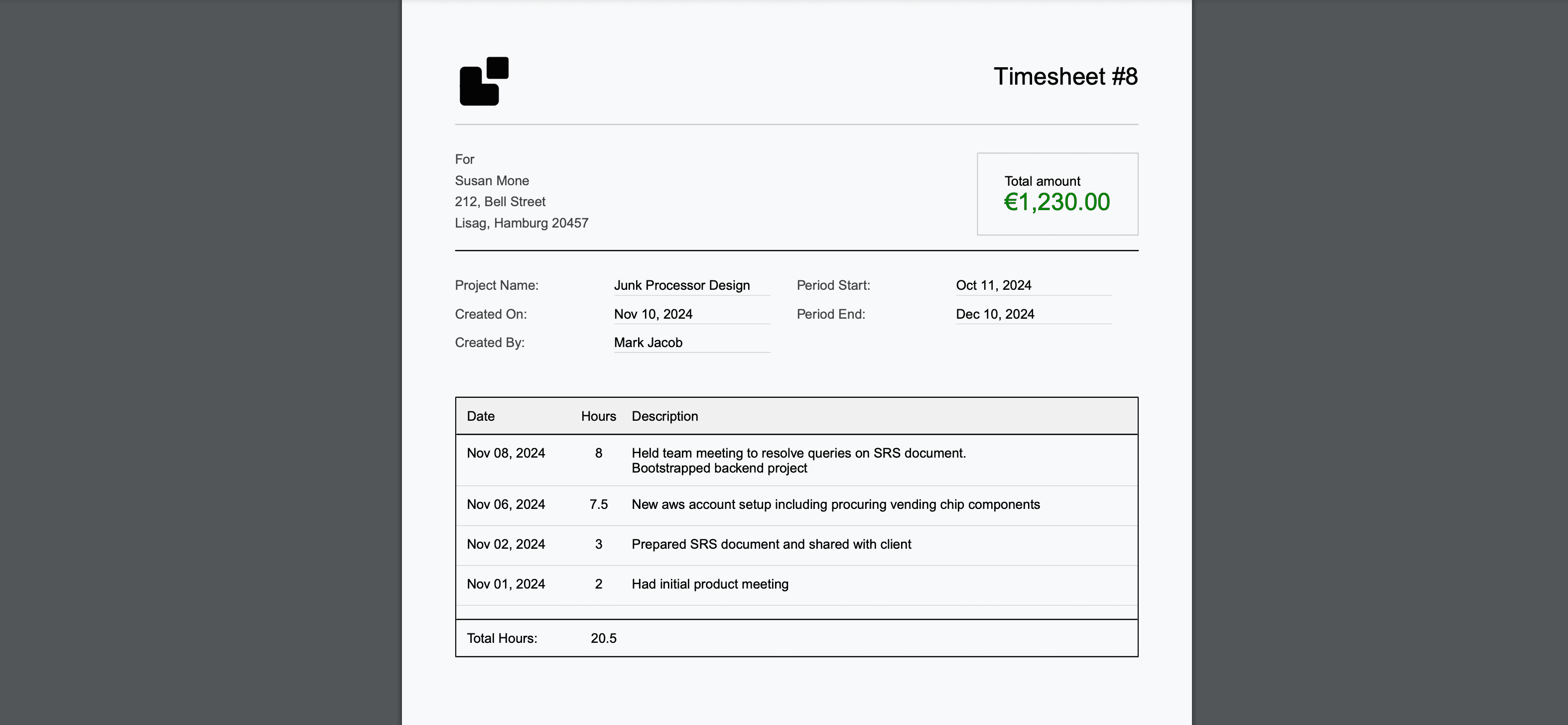

Manual time tracking is rapidly becoming a relic of the past. Studies consistently show that manual methods lose 15-25% of billable time to forgotten entries, inaccurate estimates, and the cognitive overhead of constantly switching between work and tracking. In 2025, automatic time tracking software has matured to the point where there's no legitimate reason for development teams and knowledge workers to track time by hand.
But "automatic" means different things across products. Some tools track application usage passively, others integrate with development tools to capture work activity, and the most advanced use AI to estimate time and generate professional reports. Understanding these distinctions is critical for choosing the right solution.
This guide evaluates the 7 best automatic time tracking tools available in 2025, categorized by their approach to automation and the teams they serve best. For teams already considering the move away from manual tracking, our analysis of why manual time tracking is dying provides additional context.
What Makes Time Tracking "Automatic"?
Before evaluating tools, it's important to understand the spectrum of automation:
Level 1: Timer Assistance
Tools that make manual tracking easier with one-click timers, browser extensions, and reminders. You still initiate and stop tracking manually.
Level 2: Passive Activity Monitoring
Tools that run in the background and track which applications, websites, and files you use. They capture activity data but require manual review and categorization.
Level 3: Workflow Integration
Tools that connect directly to your work tools (GitHub, Jira, etc.) and automatically create time entries based on actual work output like commits, tickets, and pull requests.
Level 4: AI-Powered Automation
Tools that combine workflow integration with AI to estimate time, generate professional descriptions, and create client-ready timesheets without any manual intervention.
The tools in this guide span all four levels. The right choice depends on your workflow, billing needs, and how much manual effort you're willing to accept.
The 7 Best Automatic Time Tracking Software for 2025
1. LogTime.ai — Best for AI-Powered Development Team Tracking
Automation Level: 4 (AI-Powered) Best For: Development teams, freelance developers, agencies billing clients
LogTime.ai represents the highest level of time tracking automation available today. By integrating directly with GitHub, it captures every commit and pull request, then uses AI to estimate time investment, generate professional descriptions, and produce client-ready timesheets.
How the Automation Works:
Code pushed to GitHub → Webhook triggers LogTime.ai
→ AI analyzes code complexity, files changed, historical patterns
→ Time estimate generated with confidence score
→ Technical commit message transformed to client-friendly description
→ Timesheet updated automatically with professional formatting
Key Automatic Features:
- GitHub Commit Tracking: Every push automatically becomes a time entry
- AI Time Estimation: Machine learning models estimate hours based on code complexity
- Smart Descriptions: Technical commit messages converted to professional summaries
- Automated Timesheets: One-click generation with company branding and multi-currency support
- Continuous Learning: AI accuracy improves over time as it learns team patterns
What Sets It Apart: LogTime.ai is the only tool that provides end-to-end automation from code commit to client-ready timesheet. Developers don't need to interact with the time tracking system at all—their normal GitHub workflow is the input.
Pricing: $9/month (Basic), $49/month (Pro), $199/month (Enterprise). 30-day free trial.
Best Use Case: A development agency with 10 developers working across 5 client projects. Before LogTime.ai, each developer spent 15-20 minutes daily on time tracking. After setup, time tracking overhead dropped to zero, and billable hour capture improved by 23%.
2. RescueTime — Best for Individual Productivity Insights
Automation Level: 2 (Passive Monitoring) Best For: Individual knowledge workers wanting productivity insights
RescueTime monitors application and website usage in the background, automatically categorizing time spent across different activities. It excels at providing a high-level view of how you spend your day.
Key Automatic Features:
- Background application and website monitoring
- Automatic productivity categorization (productive, neutral, distracting)
- Focus time detection and scoring
- Daily and weekly productivity reports
- Offline time capture
Limitations:
- Tracks applications, not specific projects or clients
- Cannot generate billable timesheets
- No development-specific integrations (GitHub, commits)
- Requires manual review to assign time to client projects
Pricing: Free (basic), $12/month (Premium).
Best Use Case: A solo developer wanting to understand personal productivity patterns and identify time wasted on distracting websites.
3. Timely — Best for AI Calendar-Based Tracking
Automation Level: 3-4 (AI-Powered Activity Tracking) Best For: Consulting teams and professionals with calendar-driven work
Timely uses AI to track time spent across applications and calendar events, creating automatic time drafts that users can review and approve.
Key Automatic Features:
- Automatic activity capture from desktop applications
- Calendar event analysis and time attribution
- AI-generated time drafts
- Memory timeline for reviewing work activity
- Team dashboard with automatic project tracking
Limitations:
- Time drafts require manual review and approval
- Limited GitHub and development tool integration
- AI estimation can be inaccurate for coding work
- Higher price point than many alternatives
Pricing: Starting at $11/user/month.
Best Use Case: A consulting team whose work revolves around meetings, document editing, and client calls tracked through calendar events.
4. Hubstaff — Best for Remote Team Monitoring
Automation Level: 2 (Passive Monitoring with Activity Tracking) Best For: Managers needing visibility into remote team activity
Hubstaff automatically tracks activity levels through keyboard and mouse monitoring, optional screenshots, and application usage tracking. It's designed for remote team management.
Key Automatic Features:
- Activity level percentage tracking
- Optional automated screenshots
- Application and URL monitoring
- GPS location tracking for mobile teams
- Automated payroll based on tracked hours
Limitations:
- Surveillance approach that can harm team trust
- No AI time estimation or smart descriptions
- Activity tracking doesn't equal productive output measurement
- No automated timesheet generation for clients
Pricing: Starting at $4.99/user/month.
Best Use Case: A remote team manager who needs to verify that distributed team members are actively working during scheduled hours.
5. Wakatime — Best for Developer Coding Metrics
Automation Level: 3 (Workflow Integration) Best For: Individual developers tracking coding time across editors
Wakatime installs as a plugin in code editors (VS Code, IntelliJ, etc.) and automatically tracks time spent coding, broken down by language, project, and file.
Key Automatic Features:
- Automatic tracking from IDE plugins
- Language and project breakdown
- Daily coding activity dashboards
- GitHub integration for public stats
- Goal setting and streak tracking
Limitations:
- Only tracks active coding in editors—misses meetings, planning, code reviews
- No automated client billing or timesheet generation
- Limited team management features
- Focused on metrics rather than billing
Pricing: Free (basic), $9/month (Premium).
Best Use Case: A developer who wants to understand how much time they spend coding across different projects and languages without any manual input.
6. Clockify Auto Tracker — Best Free Automatic Option
Automation Level: 2 (Passive Monitoring) Best For: Budget-conscious teams needing basic automatic tracking
Clockify offers an auto-tracking feature in its desktop app that monitors application usage and creates time entries automatically. Combined with its free tier for unlimited users, it's the most accessible entry point for automatic tracking.
Key Automatic Features:
- Desktop app monitors active applications
- Automatic time entry suggestions from app usage
- Manual review and approval of suggestions
- Free unlimited user access
- Basic project and client organization
Limitations:
- Auto-tracking requires desktop app installation
- Suggestions need manual review and categorization
- No AI-powered estimation or description generation
- Limited professional timesheet capabilities
Pricing: Free for unlimited users (basic features), paid from $3.99/user/month.
Best Use Case: A 20-person team that wants basic automatic tracking without any per-user costs, where manual review of auto-tracked entries is acceptable.
7. Time Doctor — Best for Compliance-Focused Teams
Automation Level: 2 (Passive Monitoring with Compliance) Best For: Organizations requiring documented proof of work hours
Time Doctor automatically monitors work activity with screenshots, web/app tracking, and detailed reports designed for compliance documentation and remote team management.
Key Automatic Features:
- Automated time capture with activity monitoring
- Distraction alerts for off-task behavior
- Client login for transparent reporting
- Payroll integration with tracked hours
- Detailed productivity reports
Limitations:
- Heavy monitoring approach impacts team morale
- No development-specific integrations
- Compliance focus over developer experience
- No AI-powered features
Pricing: Starting at $5.90/user/month.
Best Use Case: BPO or outsourcing firms that need to provide clients with documented proof of work hours and activity levels.
Comparison by Automation Level
| Tool | Level | Input Required | Output Quality | Best For |
|---|---|---|---|---|
| LogTime.ai | 4 - AI | None (GitHub) | Client-ready timesheets | Dev teams, agencies |
| Timely | 3-4 | Review drafts | Good time drafts | Consultants |
| Wakatime | 3 | None (IDE) | Coding metrics | Individual devs |
| RescueTime | 2 | Review categories | Productivity reports | Individuals |
| Hubstaff | 2 | None (passive) | Activity reports | Remote managers |
| Clockify Auto | 2 | Review suggestions | Basic time entries | Budget teams |
| Time Doctor | 2 | None (passive) | Compliance docs | Outsourcing firms |
Choosing the Right Automatic Time Tracking Software
For Development Teams Billing Clients
LogTime.ai is the clear choice. It's the only tool that provides end-to-end automation from code activity to professional timesheet, eliminating all manual tracking overhead while maximizing billable hour capture.
For Personal Productivity Optimization
RescueTime or Wakatime (for developers) provide valuable self-awareness without any billing or team management complexity.
For Large Remote Teams on a Budget
Clockify's auto-tracker provides acceptable automation at no per-user cost, though the manual review step adds overhead.
For Calendar-Driven Professionals
Timely excels when work revolves around meetings, calls, and document work rather than code commits.
For Compliance Requirements
Time Doctor or Hubstaff serve organizations where documented proof of work activity is a contractual or regulatory requirement.
The Future of Automatic Time Tracking
Automatic time tracking is evolving rapidly. In 2025, we're seeing several trends that will shape the next generation of tools:
- Deeper AI Integration: More accurate time estimation with contextual understanding of work complexity
- Cross-Platform Automation: Tools that capture work across all platforms, not just one tool category
- Predictive Capabilities: AI that forecasts project timelines based on historical tracking data
- Natural Language Processing: Converting any work activity into professional billing descriptions
Teams that adopt advanced automation now will have a significant competitive advantage as these capabilities mature. For a deeper look at where the industry is heading, explore our analysis of AI trends in time management.
Conclusion
The best automatic time tracking software for your team depends on your primary workflow and billing needs. For development teams using GitHub, LogTime.ai provides the most complete automation pipeline. For individual productivity, RescueTime and Wakatime offer effortless insights. For budget-constrained teams, Clockify's free auto-tracker provides a solid starting point.
The key insight is this: every hour your team spends manually tracking time is an hour lost to administrative overhead. The right automatic tool eliminates that overhead entirely while improving the accuracy and professionalism of your time data.
Ready to eliminate manual time tracking? Start your free LogTime.ai trial and experience the highest level of time tracking automation available.
Questions about choosing the right automatic tracking solution? Contact support@logtime.ai for personalized guidance.