
Jira's built-in time tracking has long been the default for development teams already using the platform for project management. But most teams quickly discover that Jira's native time logging is basic, manual, and disconnected from actual development workflows. Developers end up spending more time filling in work logs than the feature is worth, leading to inaccurate data and widespread tracking fatigue.
The good news is that a growing ecosystem of specialized time tracking tools offers far superior experiences for development teams. From AI-powered automation to GitHub-native integrations, these alternatives address every limitation of Jira's built-in tracking while providing professional timesheet generation and billing capabilities that Jira simply doesn't offer.
If your team has been struggling with time tracking fatigue, switching to a purpose-built tool can recover hours of lost productivity each week.
Why Jira's Built-In Time Tracking Falls Short
Core Limitations
Manual Work Logging Jira requires developers to manually enter time against each issue, typically after the work is done. This means:
- Estimates are often rounded or guessed
- Developers forget to log time for smaller tasks
- Context switching between coding and logging disrupts flow
No Automation Jira doesn't automatically capture time from development activity. Every hour must be manually entered, creating a significant administrative burden for teams that need accurate tracking.
Limited Reporting While Jira offers basic time reports, it lacks:
- Professional timesheet generation for client billing
- Multi-currency support for international teams
- AI-powered work descriptions for non-technical stakeholders
- Automated weekly or monthly timesheet delivery
Developer Experience The time logging interface in Jira is designed for project managers, not developers. It's cumbersome, requires navigating away from code, and adds friction to an already complex tool.
The 8 Best Jira Time Tracking Alternatives
1. LogTime.ai — Best for Automated GitHub-Based Time Tracking
Best For: Development teams wanting zero-effort time tracking through GitHub integration.
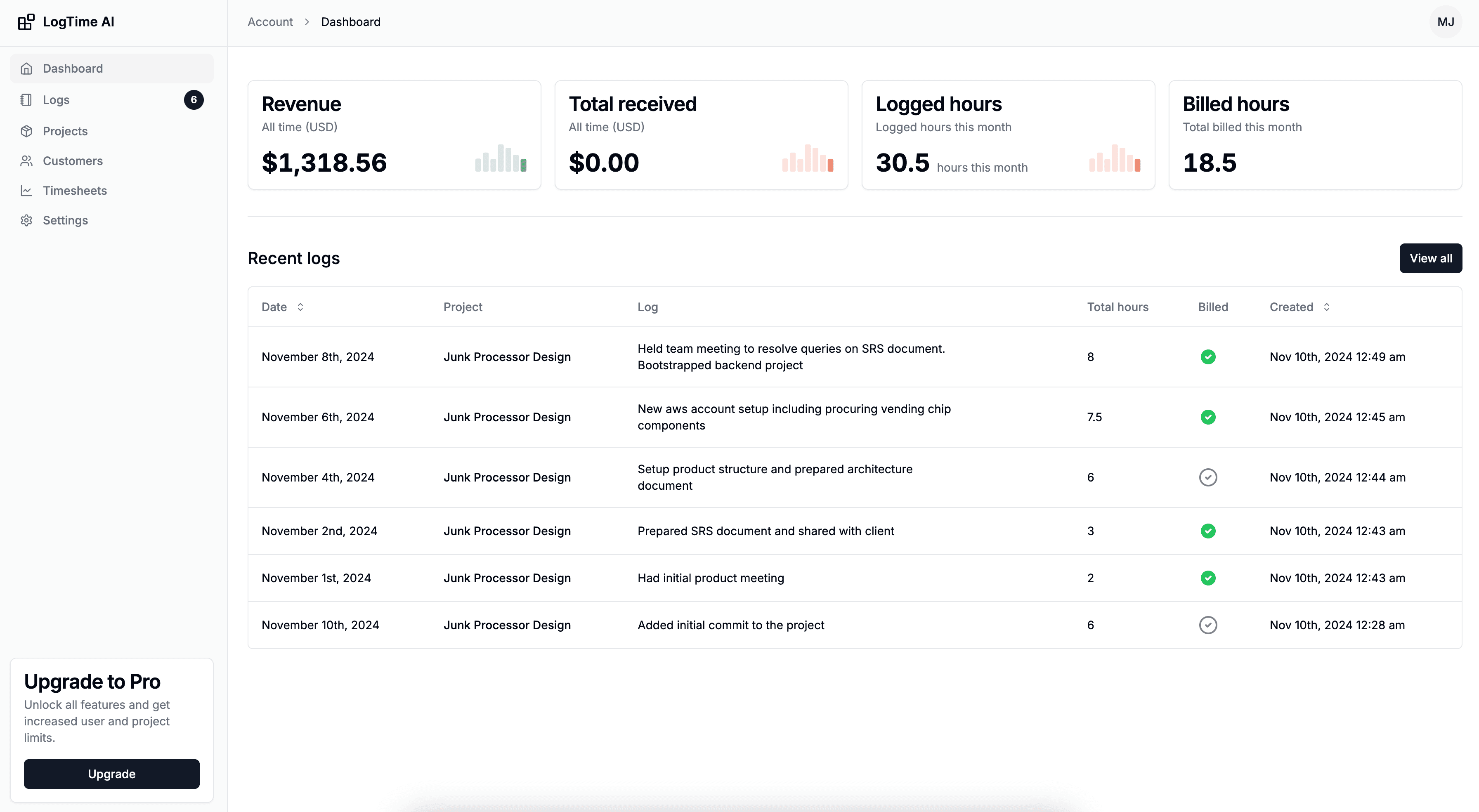
LogTime.ai fundamentally reimagines time tracking for developers. Rather than requiring manual input through Jira's work log interface, LogTime.ai automatically generates time entries from GitHub commits, making tracking completely passive for developers.
Key Advantages Over Jira:
- Zero Manual Input: Time is captured automatically from GitHub commits and pull requests
- AI Time Estimation: Machine learning estimates time from code complexity and historical patterns
- Professional Timesheets: One-click generation of branded, client-ready timesheets
- Smart Descriptions: AI transforms commit messages into professional work summaries
- Multi-Currency Billing: Handle international clients with automatic conversion
How It Works:
Developer pushes code → LogTime.ai captures commit
→ AI analyzes complexity → Time estimate generated
→ Professional description created → Timesheet updated
Pricing: $9/month (Basic), $49/month (Pro), $199/month (Enterprise). 30-day free trial.
2. Toggl Track — Best for Simple Timer-Based Tracking
Best For: Teams that prefer manual timer workflows but want a better experience than Jira.
Toggl Track replaces Jira's clunky work log with a clean one-click timer interface. Its browser extension makes starting and stopping timers easier than navigating to Jira issues.
Key Features:
- One-click timer start/stop across all platforms
- Browser extension for quick tracking
- Calendar integration for time visualization
- Basic Jira integration for syncing entries
- Team dashboards and reporting
Pricing: Free for up to 5 users, $9/user/month for teams.
Limitation: Still manual—developers must remember to start and stop timers.
3. Tempo Timesheets — Best for Jira-Native Experience
Best For: Teams heavily invested in Jira who want enhanced time tracking within the Jira ecosystem.
Tempo is the most popular Jira time tracking plugin, extending native capabilities with better reporting, approvals, and planning features.
Key Features:
- Native Jira integration as a marketplace plugin
- Timesheet approval workflows
- Team capacity planning
- Integration with Tempo Budgets and Tempo Planner
- Custom reporting and dashboards
Pricing: Starting at $10/user/month.
Limitation: Still requires manual time logging within Jira—no automation from development activity.
4. Harvest — Best for Billing-Focused Teams
Best For: Agencies and consultancies that need integrated invoicing alongside time tracking.
Harvest combines time tracking with native invoicing, making it attractive for teams where converting tracked time to client bills is the primary workflow.
Key Features:
- Built-in invoicing from tracked time
- Expense tracking integration
- Budget monitoring with visual alerts
- QuickBooks and Xero integration
- Timesheet approval system
Pricing: Free for 1 user/2 projects, $10.80/user/month for full access.
Limitation: Manual tracking only, no developer-specific automation features.
5. Clockify — Best Free Alternative for Large Teams
Best For: Large development teams needing basic time tracking without per-user costs.
Clockify provides a generous free tier that makes it practical for enterprise teams where per-seat licensing would be prohibitive.
Key Features:
- Unlimited free users for core features
- Timer and manual entry options
- Basic Jira integration
- Project and client organization
- Exportable reports and timesheets
Pricing: Free for unlimited users, paid features from $3.99/user/month.
Limitation: Free tier has limited reporting; no automated development tracking.
6. Hubstaff — Best for Remote Team Visibility
Best For: Managers needing activity monitoring alongside time tracking for distributed teams.
Hubstaff combines time tracking with employee monitoring, providing visibility into how remote team members spend their work hours.
Key Features:
- Activity level monitoring and screenshots
- Application and URL tracking
- GPS tracking for mobile teams
- Automated payroll processing
- Productivity scoring
Pricing: Starting at $4.99/user/month.
Limitation: Monitoring approach can damage team culture and trust. No code-based time tracking.
7. Everhour — Best for Project Management Integration
Best For: Teams using Asana, Basecamp, or Trello alongside Jira who need cross-platform time tracking.
Everhour provides clean integrations with multiple project management tools, making it suitable for teams with diverse tooling across departments.
Key Features:
- Integrations with Jira, Asana, Trello, Basecamp, and Monday.com
- In-tool time tracking widgets
- Budget and cost tracking
- Team performance dashboards
- Client invoicing features
Pricing: Free for up to 5 users, $8.50/user/month for teams.
Limitation: Broad but shallow integrations—lacks the depth of developer-specific tools.
8. RescueTime — Best for Passive Activity Tracking
Best For: Individual developers who want automatic activity categorization without manual input.
RescueTime runs in the background and tracks application usage automatically, providing productivity insights without requiring any manual time entry.
Key Features:
- Automatic application and website tracking
- Productivity scoring and goals
- Focus time features and distraction blocking
- Detailed activity reports
- Offline time tracking
Pricing: Free (basic), $12/month (Premium).
Limitation: Tracks application usage, not specific project or client work. Not suitable for client billing.
Feature Comparison Matrix
| Feature | LogTime.ai | Toggl | Tempo | Harvest | Clockify | Hubstaff | Everhour | RescueTime |
|---|---|---|---|---|---|---|---|---|
| Auto GitHub Tracking | Yes | No | No | No | No | No | No | No |
| AI Time Estimation | Yes | No | No | No | No | No | No | No |
| Jira Integration | Roadmap | Yes | Native | Yes | Yes | Yes | Yes | No |
| Auto Timesheets | Yes | No | No | No | No | No | No | No |
| Multi-Currency | Yes | Yes | No | Yes | Paid | Yes | Yes | No |
| Free Trial/Tier | 30 days | Free | Trial | Free | Free | 14 days | Free | Free |
| Client Billing | Yes | No | No | Yes | Paid | Yes | Yes | No |
| Zero Developer Effort | Yes | No | No | No | No | No | No | Partial |
How to Choose the Right Alternative
For Development Teams Using GitHub
Choose LogTime.ai. If your team's primary development workflow revolves around GitHub, LogTime.ai provides unmatched automation. Developers never need to log time manually—every commit automatically becomes an intelligent time entry. This approach consistently delivers 95%+ time capture accuracy, compared to 75-80% with manual tools.
For Teams Locked into Jira
Choose Tempo Timesheets. If your organization mandates Jira and you need enhanced time tracking within that ecosystem, Tempo is the natural upgrade. Just understand that you're improving the Jira experience, not solving the fundamental problem of manual logging.
For Agencies Needing Invoicing
Choose Harvest or LogTime.ai. If billing workflow is your primary concern, Harvest offers the tightest native invoicing integration. However, LogTime.ai's automated tracking combined with professional timesheet generation often provides better overall value for development agencies.
For Budget-Constrained Teams
Choose Clockify. When budget is the primary constraint and basic tracking suffices, Clockify's free tier for unlimited users is hard to beat.
For Individual Productivity
Choose RescueTime. If you're focused on personal productivity insights rather than client billing, RescueTime's passive tracking provides valuable self-awareness without any manual effort.
Migration Tips: Moving Away from Jira Time Tracking
- Audit Current Usage: Review how your team currently uses Jira time logging—identify gaps and pain points
- Define Requirements: List must-have features (automation, billing, reporting, integrations)
- Trial Period: Most tools offer free trials—test with a small team first
- Parallel Operation: Run both systems for 2-3 weeks to compare accuracy
- Gather Feedback: Let developers voice their preference—adoption depends on developer buy-in
- Full Transition: Once validated, migrate fully and update team workflows
For teams looking for comprehensive setup guidance, our guide on implementing GitHub time logging walks through the complete transition process.
Conclusion
Jira's built-in time tracking was never designed as a comprehensive time management solution—it's a basic feature within a project management tool. Development teams that need accurate billable hour tracking, professional timesheet generation, or automated time capture will find significantly better options in purpose-built alternatives.
For teams using GitHub, LogTime.ai offers the most transformative upgrade by eliminating manual time entry entirely. The result is more accurate data, happier developers, and recovered revenue from previously untracked billable hours.
Ready to replace Jira's manual time logging with intelligent automation? Start your free LogTime.ai trial and experience what zero-effort time tracking feels like for your development team.
Have questions about migrating from Jira time tracking? Reach out to support@logtime.ai—we'll help you plan a smooth transition.